
NinjaTrader Download Information
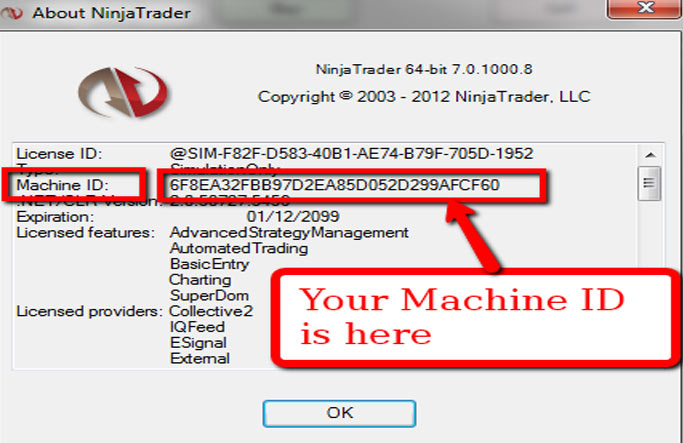
Hawkeye software is linked to your NinjaTrader Machine ID (Customer Number). In order for Hawkeye to authenticate, please enter your Machine ID in the customer number field below. IP addresses are used and will be denied if suspicious activity is detected.
[i4w_webform]
[/i4w_webform]
Here is the latest installation for the Hawkeye Standard (Premiere) Package for NinjaTrader. Below you will find your download links and other important information to make your installation smooth and error free. Let us know if you need any assistance at all.
Quick Installation Instructions:
- Click the Download & Installation button above and save the setup file to your computer (desktop)
- Make sure NinjaTrader is closed.
- Double-click the setup file (.exe) to install the package on your computer, following the on-screen instructions.
Once finished, launch NinjaTrader.
For your convenience there are several workspaces already configured with Hawkeye indicators. To find these simply go to File>Workspaces>Open Workspace.
Documentation can be found here:
NinjaTrader Indicator Guide
Hawkeye-Trading-Rules
Congratulations and good trading!
Team Hawkeye