
[i4w_casetag]
any_tagid: 2491
[i4w_set activelicense=”alice”]
any_tagid: 2493
[i4w_set activelicense=”boris”]
any_tagid: 2495
[i4w_set activelicense=”carla”]
any_tagid: 2497
[i4w_set activelicense=”derek”]
any_tagid: 2786
[i4w_set activelicense=”emily”]
any_tagid: 2788
[i4w_set activelicense=”frank”]
else:
[i4w_set activelicense=”current”]
[/i4w_casetag]
[i4w_onlyfor tagid=’621′]
TradeStation Download Information
- Exit TradeStation
- Click the Download link above and save the Setup file to your computer
- Double-click the Setup File (.exe) to begin the installation process. TradeStation will launch and simply follow the directions and accept all files.
- When completed, enter your Hawkeye Customer ID and restart TradeStation.
[/i4w_onlyfor]
MetaTrader Download Information
Below is the latest download and installation link for your Hawkeye Grabba Indicator for MT4.
If you have any further questions please let us know.
Congratulations and good trading!
Team Hawkeye
Summary for quick installation:
- Exit your MetaTrader4 application.
- Download the files to your computer.
- Then double-click to install each Hawkeye program.
- Enter your Hawkeye ID:
- When prompted, click the Browse button and navigate to your broker/install directory.
- Click the Finish button.

You will need to check your “Accept DLL” switch is turned on in your settings. Go to your MT4 menu, and click “Tools -> Options” and click on the “Expert Advisors” tab. Make sure the “Allow DLL imports” box is checked, along with “Allow external experts imports”.
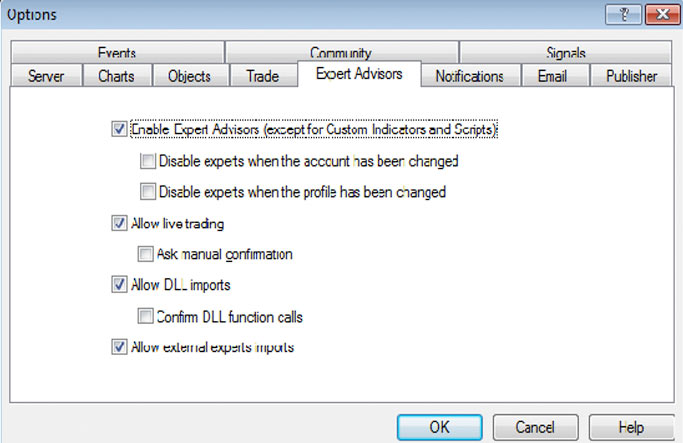
All of this is fully explained in the MT4 Indicator Guide.
Hawkeye-Indicator-Guide-Metatrader
If you have any further questions please let us know.
Congratulations and good trading!
Team Hawkeye
Below is the latest Hawkeye Grabba Indicator installation link. You can use this download link as many times as required in setting up any additional PCs, so for example you may wish to have one copy on your PC, and another on your laptop, but you will not be able to log in simultaneously.
Here is your download link for your Hawkeye Grabba Indicator for TradeStation:
Hawkeye Grabba Indicator for TradeStation
Here is your Quick Installation Guide: TS Hawkeye Installation Guide
Note: This guide refers to Hawkeye indicators specifically, but it is exactly the same for any package you install on TradeStation.
NinjaTrader 7 Download Information
Here is the latest installation for the Hawkeye Grabba Indicator for NinjaTrader 7. Below you will find your download links and other important information to make your installation smooth and error free. Let us know if you need any assistance at all.
Quick Installation Instructions:
- Click the download link below and save the setup file to your computer (desktop)
- [LINK] Hawkeye Grabba Indicator for NinjaTrader 7 [LINK]
- Make sure NinjaTrader is closed.
- Double-click the setup file (.exe) to install the package on your computer, following the on-screen instructions.
Once finished, launch NinjaTrader.
Documentation can be found here:
NT7 Hawkeye Indicator Guide
If you have any further questions please let us know.
Congratulations and good trading!
Team Hawkeye
NinjaTrader 8 Download Information
Here is the latest installation for the Hawkeye Grabba Indicator for NinjaTrader 8. Below you will find your download links and other important information to make your installation smooth and error free. Let us know if you need any assistance at all.
Quick Installation Instructions:
- Click the download link below and save the setup file to your computer (desktop)
- [LINK] Hawkeye Grabba Indicator for NinjaTrader 8 [LINK]
- Make sure NinjaTrader is closed.
- Double-click the setup file (.exe) to install the package on your computer, following the on-screen instructions.
Once finished, launch NinjaTrader.
Documentation can be found here:
NT8 Hawkeye Installation Guide
If you have any further questions please let us know.
Congratulations and good trading!
Team Hawkeye
eSignal Download Information
Here is the latest installation for the Hawkeye Grabba Indicator for eSignal.
Hawkeye for eSignal Quick Installation Guide: ES Hawkeye Quick Installation Guide
Below you will find your download links and other important information to make your installation smooth and error free. Let us know if you need any assistance at all.
Quick Installation Instructions:
- Click one of the following links according to which version of eSignal you are using and save the setup file to your computer (desktop)
- [LINK] Hawkeye Grabba Indicator for eSignal 32-bit [LINK]
- [LINK] Hawkeye Grabba Indicator for eSignal 64-bit [LINK]
- Make sure eSignal is closed.
- Double-click the setup file (.exe) to install the package on your computer, following the on-screen instructions.
Once finished, launch eSignal.
You may download the Hawkeye for eSignal User Guide here: ES Hawkeye User Manual
If you have any further questions please let us know.
Congratulations and good trading!
Team Hawkeye
MultiCharts Download Information
[evp_embed_video url=”http://evphosted-14d5bf6242eae0.s3.amazonaws.com/hawkeye-gearbox-gearchanger-1.mp4” preload=”auto” template=”mediaelement” width=”100%”]
Here is the latest installation for the Hawkeye Grabba Indicator for MultiCharts.
Hawkeye for MultiCharts Quick Installation Guide: MC Hawkeye Quick Installation Guide
Below you will find your download links and other important information to make your installation smooth and error free. Let us know if you need any assistance at all.
Quick Installation Instructions:
- Click one of the following links according to which version of eSignal you are using and save the setup file to your computer (desktop)
- [LINK] Hawkeye Grabba Indicator for eSignal 32-bit [LINK]
- [LINK] Hawkeye Grabba Indicator for eSignal 64-bit [LINK]
- Make sure eSignal is closed.
- Double-click the setup file (.exe) to install the package on your computer, following the on-screen instructions.
Once finished, launch eSignal.
You may download the Hawkeye for eSignal User Guide here: MC Hawkeye User Manual
and the Trading Rules document from here:
If you have any further questions please let us know.
Congratulations and good trading!
Team Hawkeye